

- Credentials: Passkeys for humans, protected keys for service accounts
- Roles: Control who can do what
- Policies: Enforce rules on transactions and sensitive operations
- Address poisoning protection: Outbound transfer screening and transaction history warnings
- Address book: Recognize your counterparties with human-readable aliases
- Verified assets: Filter out spam tokens and suspicious transactions
Credentials
Every human user should hold three credentials:- Main credential: a passkey on the device they work from daily.
- Backup credential: a second passkey on a separate device, so losing the main device doesn’t mean losing the account. A hardware security key such as a YubiKey is ideal: it is independent of any phone or laptop and can be stored offline in a safe place.
- Recovery credential: the recovery kit issued at registration, stored securely offline, to regain access if both passkeys are lost.
Browser hardening for the dashboard
The DFNS dashboard runs atapp.dfns.io in a standard browser. A malicious or compromised browser extension can read and alter any page it runs on — including what an approver sees before they sign. On managed devices, reduce that exposure:
- Block extensions on the DFNS domain. In your enterprise browser policy — for example Chrome’s
runtime_blocked_hosts— block extension content scripts from running ondfns.io. Extensions keep working everywhere else but cannot read or modify the dashboard. - Allowlist extensions org-wide. Permit only vetted, business-required extensions instead of letting users install any extension.
- Use a dedicated or managed browser profile for dashboard access, isolated from general browsing.
This hardens the browser session, not your keys. Signing always requires a passkey or protected key that an extension cannot produce, so a tampered page cannot forge an approval — this is defense in depth against a manipulated approval surface.
IP allowlist
DFNS can restrict your organization to a fixed set of source IP addresses. When the allowlist is enabled, every authenticated request from your org is checked against it, and any request whose source IP is not on the list is rejected with a403 Forbidden. The check runs on the source IP of each request, so it covers all authenticated org traffic — dashboard sessions in the browser as well as API calls made by service accounts and personal access tokens.
Enabling the allowlist is not self-service: contact DFNS to turn it on for your org and to set the allowed entries. Both individual addresses and CIDR ranges are supported.
Policy templates by use case
Governance policies
To create the first three policies, go to
Org > Policies and click New Policy. Select the appropriate activity type and configure approval groups to require at least a 1-out-of-2 quorum. User-action policies are created through the API.
Treasury management
For internal teams managing company wallets with multi-signature approvals:Exchange/trading operations
For high-volume operations with exchange integrations:When using exchange integrations, withdrawals to DFNS wallets may need to be whitelisted in the exchange’s address book (e.g., Kraken, Coinbase Prime).
B2B payments
For business payments and vendor disbursements:Role templates
Follow the principle of least privilege: give users only the roles they need for their responsibilities, and don’t assignManagedFullAdminAccess to everyone — create custom roles instead. Create these roles in Settings > Permissions and assign them based on responsibilities.
Admin
Full organizational control. Assign sparingly. You can useManagedFullAdminAccess for this role. The list of whitelisted actions is maintained by DFNS and contains all permissions.
Approver
Reviews and approves transactions. Cannot initiate them.Operator
Day-to-day transaction operations.Read-only auditor
View-only access for compliance and audit purposes.Service account (automation)
For server-to-server API integrations. See service accounts guide.Address poisoning protection
In an address poisoning attack, a scammer:- Sends a tiny transaction to your wallet from an address that looks nearly identical to one you regularly send to (matching first and last characters)
- Hopes you copy that lookalike address from your transaction history when making your next transfer
Outbound: transfer screening
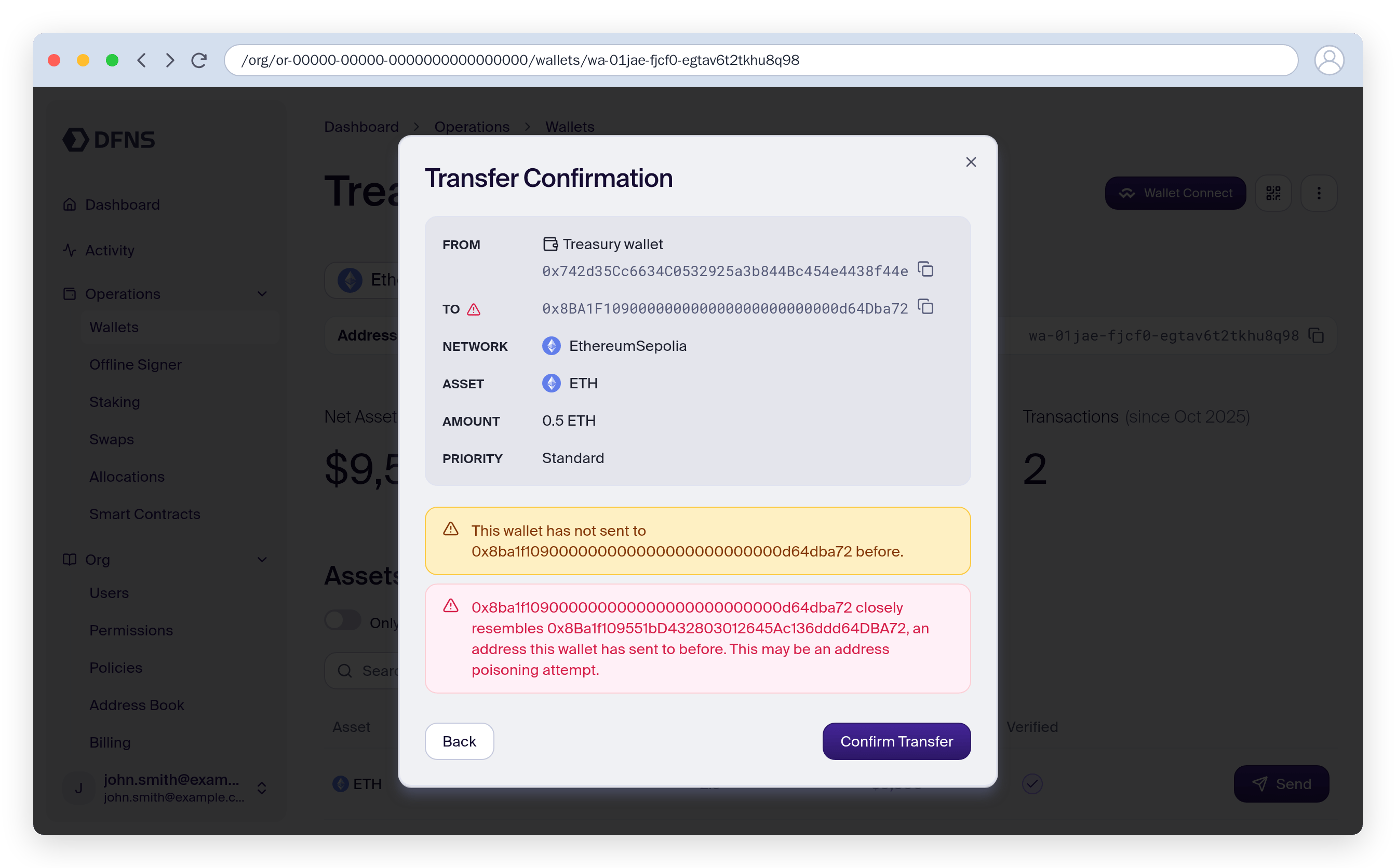
When you create a transfer in the dashboard, the destination address is screened at the confirmation step:- A red warning appears when the destination closely resembles an address the wallet has sent to before — the signature of an address poisoning attempt. The warning names the resembled address so you can compare.
- A yellow notice appears when the wallet has never sent to the destination before, prompting a first-time check.
TransactionRecipientWhitelist policy.
Lookalike detection covers EVM networks, Tron, Stellar, XRP Ledger, Bitcoin, Solana, and TON. The first-time-counterparty check runs on every network.
Inbound: transaction history warnings
In transaction history, any address that is not one of your organization’s wallets and not in your address book is marked with a red warning icon. Hovering it shows the full address and a reminder to be careful when copying — so a poisoned deposit’s sender stands out instead of blending in with your real counterparties.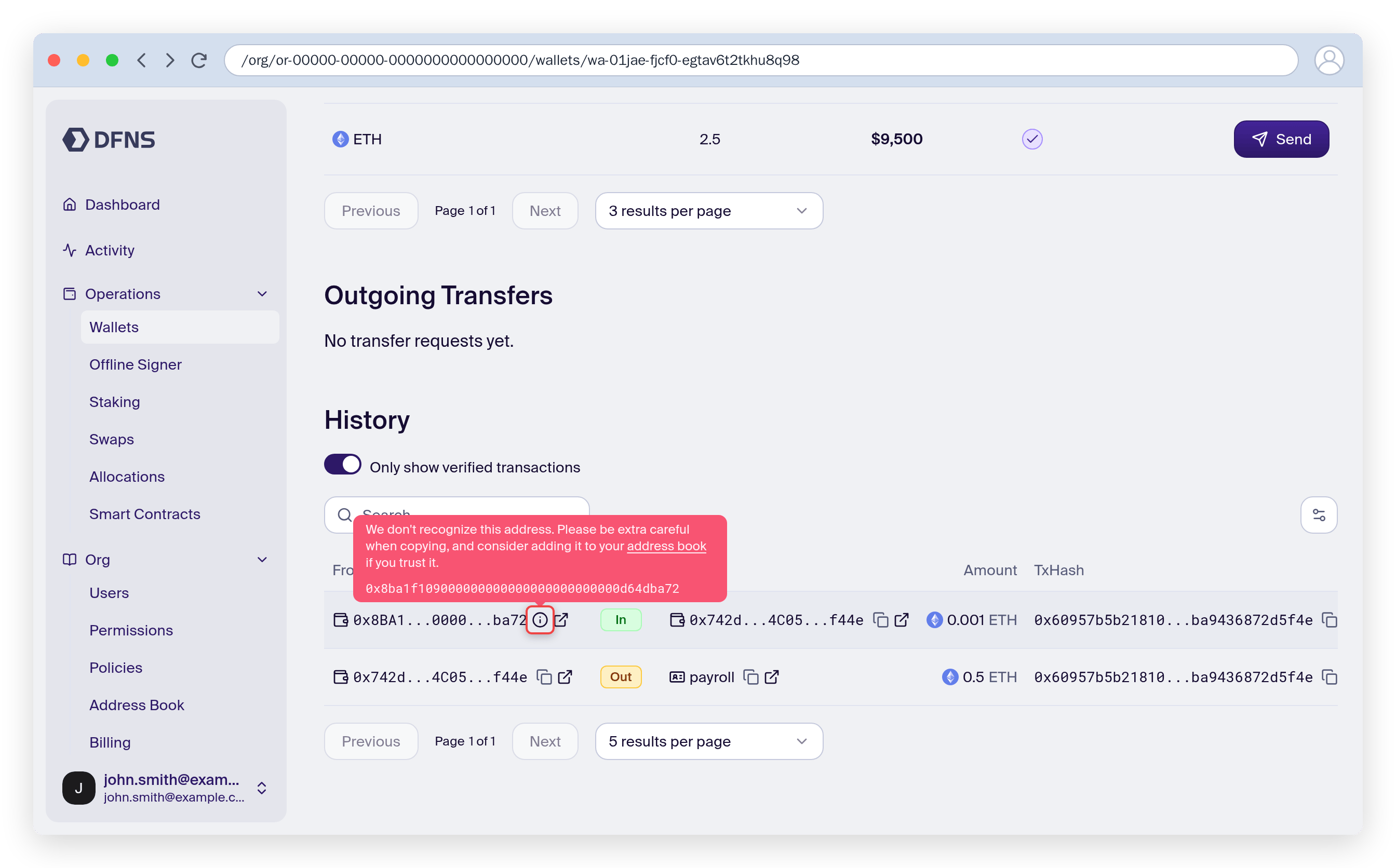
Using the address book
The address book helps you manage blockchain addresses with human-readable aliases. Beyond convenience, it powers the inbound warnings above: aliased addresses are recognized, everything else is flagged.Address book management
- Use clear naming conventions: Include vendor/partner name, purpose, and network (e.g., “acmecorp-payroll”)
- Add descriptions: Note the business relationship or account purpose
- Review regularly: Remove aliases for addresses no longer in use
- Update promptly: Add new addresses as soon as you establish new business relationships
Address book vs policy whitelisting
These are complementary features:- Address Book: Visual convenience and warnings. Helps you recognize addresses in the UI. Does not block transactions.
- TransactionRecipientWhitelist policy: Enforcement. Blocks transactions to non-whitelisted addresses (or requires approval).
Handling spam and scam tokens
Blockchain addresses can receive unsolicited tokens (airdrops, spam, scam tokens). DFNS provides tools to filter these out.Verified assets and transactions
On each wallet page, use the filtering toggles to focus on legitimate assets: Assets section:- Toggle: “Only show verified assets”
- The “Verified” column indicates which tokens are verified by DFNS
- Toggle: “Only show verified transactions”
- The “Verified” column shows transaction verification status
What “verified” means
- DFNS maintains a list of verified tokens and contracts across supported networks
- Verified: Token is a known legitimate asset
- Not verified: Token is not in DFNS’s verified list (doesn’t necessarily mean malicious, but warrants caution)
- Your own tokens: if you use a token DFNS does not verify, register it as verified for your organization
Testnet tokens are typically not verified. This is expected behavior.
Incoming transaction screening with Chainalysis
For additional protection, integrate Chainalysis KYT to automatically screen transactions:ChainalysisTransactionPrescreening: Screen outbound transactions before signingChainalysisTransactionScreening: Flag incoming transactions from suspicious addresses
Day-to-day security operations
Reviewing pending approvals
When policies trigger approval requests:- Go to
Activityin the dashboard to see pending approvals - Review the transaction details, including recipient address and amount
- Verify the recipient is in your address book or is otherwise expected
- Approve or reject the request
The person who initiated a transaction cannot approve it themselves (unless
initiatorCanApprove is enabled on the policy).Monitoring transactions
- Check the “Verified” column in transaction history
- Enable webhooks for real-time notifications
- Export transaction history for compliance records (
Wallet > Export)
Regular security hygiene
Next steps
Create policies
Step-by-step policy creation in the dashboard
Manage users and roles
Invite users and assign roles
Use the address book
Create and manage address aliases
Chainalysis integration
Set up AML/KYT transaction screening