

OpenAPI
You can find the OpenAPI specification of the DFNS API here: OpenAPI Specification This spec always reflects the current platform version. To download the spec for an earlier release, use the Download OpenAPI spec link on that release in the platform change log.Postman
The DFNS Postman collection lets you test API endpoints without writing code. It includes a pre-request script that automatically handles User Action Signing for state-changing requests (POST, PUT, DELETE). The button below always forks the collection for the current platform version. To download the collection for an earlier release, use the Download Postman collection link on that release in the platform change log.
Setup
1
Generate a key pair
Generate an ECDSA key pair that will be used to sign requests:Keep the private key file (
prime256v1.pem) secure - you’ll need it in Step 3.2
Create a Personal Access Token (PAT)
- Go to Settings > Personal Access Token in the DFNS Dashboard
- Click New Personal Access Token
- Paste the contents of
prime256v1.public.peminto the Public Key field - Click Create
3
Configure the Postman environment
- In Postman, go to Environments in the left sidebar
- Select the DFNS API - Prod environment
- Fill in the Current Value column:
- Click Save
- Set this environment as Active using the dropdown in the top-right corner of Postman
4
Verify the pre-request script
Before making requests, verify the pre-request script is present: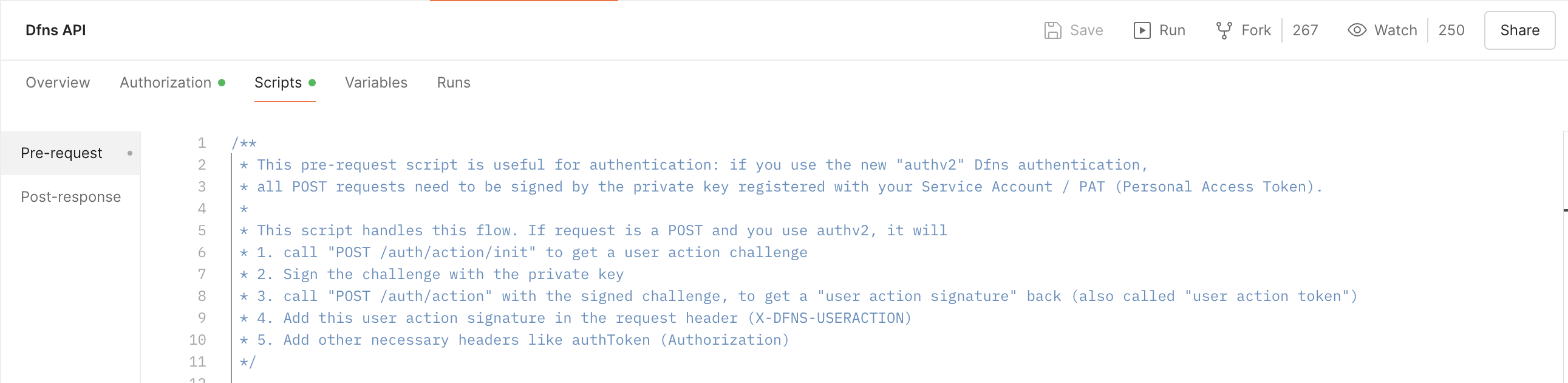
- Click on the DFNS API collection name in the left sidebar
- Go to the Scripts tab (or Pre-request Script in older Postman versions)
- You should see JavaScript code that handles User Action Signing
5
Test with a GET request
Start with a read-only request to verify your setup:
- Open Wallets > List Wallets (
GET /wallets) - Click Send
- You should receive a
200response with your wallets list
How the pre-request script works
The pre-request script automatically handles User Action Signing for POST, PUT, and DELETE requests:- Detects when you’re making a state-changing request
- Calls
/auth/action/initto get a challenge - Signs the challenge using your
credentialPrivateKey - Populates the
X-DFNS-USERACTIONheader with the signed result
Quick checklist
If requests aren’t working, verify each of these:- You forked the collection using the “Run in Postman” button (not imported manually)
- The DFNS API - Prod environment is selected as active (top-right dropdown)
- All three variables have Current Values filled in (not just Initial Value)
-
authTokenis the full JWT string from your Personal Access Token -
credentialPrivateKeyincludes the full PEM with-----BEGIN EC PRIVATE KEY-----and-----END EC PRIVATE KEY-----headers -
dfnsApiDomaindoes not includehttps://— justapi.dfns.io - The pre-request script exists on the collection level (click the collection name, then Scripts tab)
Troubleshooting
Pre-request script is empty
If the Scripts tab shows no code:- Re-fork the collection - Don’t import manually. Use the “Run in Postman” button above to fork the official collection.
- Check the collection level - The script is on the collection, not individual requests. Click the collection name, not a specific endpoint.
- Update Postman - Older versions may have issues with collection scripts.
403 “User action signature is missing”
This error means the pre-request script didn’t run or failed. Check:- Environment is active - Verify your environment is selected in the top-right dropdown
- All variables have Current Values - Initial Value is not used; you must fill Current Value
- Private key format - Must include full PEM format with headers and newlines
- Check Postman Console - Go to View > Show Postman Console to see script errors
401 Unauthorized
- Verify
authTokenis correct (it’s a long JWT string) - Check
dfnsApiDomainmatches your organization’s region - Ensure the PAT hasn’t been revoked or expired. Decode your token at jwt.io and check the
expfield for the expiry date.
Request hangs or times out
- Check
dfnsApiDomaindoesn’t includehttps://(just useapi.dfns.io) - Verify you have network access to the DFNS API