> ## Documentation Index
> Fetch the complete documentation index at: https://docs.dfns.co/llms.txt
> Use this file to discover all available pages before exploring further.
# Chainalysis
> Screen inbound and outbound transactions with Chainalysis KYT for AML compliance, with automatic enforcement through DFNS policies and webhooks.
export const Youtube = props => {
return ;
};
[Chainalysis](https://www.chainalysis.com/) is the industry leader in blockchain analysis and transaction monitoring. Their KYT (Know Your Transaction) platform provides real-time risk scoring and investigative tools to help meet AML compliance requirements.
## Setup
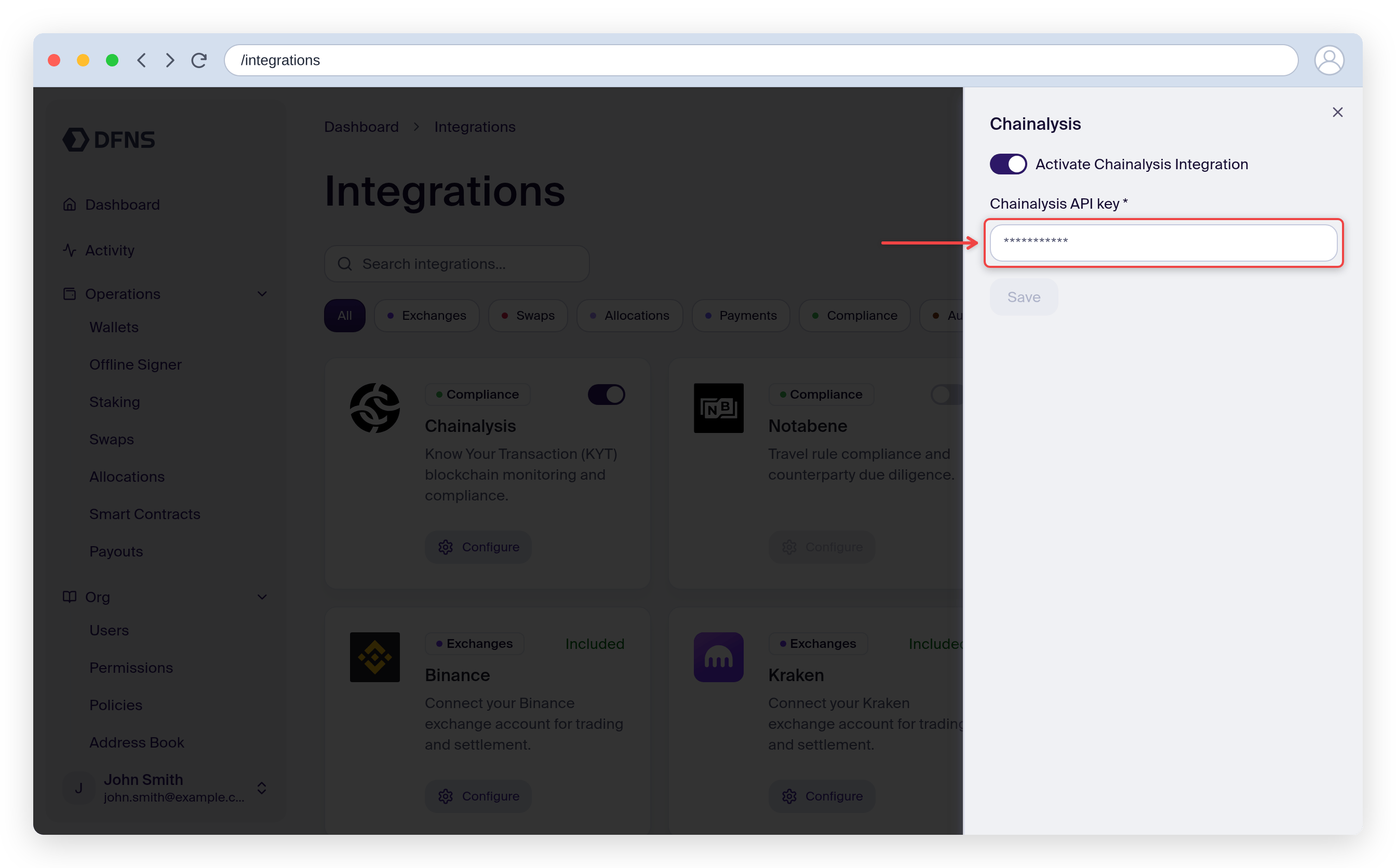
In the DFNS Dashboard, navigate to **Integrations**, find the **Chainalysis** card, and click **Configure**.
Toggle **Activate Chainalysis Integration**, then enter your **Chainalysis API key**.
Click **Save**. The integration is now active, and the Chainalysis rules become available in the policy builder.
## Outbound transfer prescreening
Outbound transfers can be screened by Chainalysis before they are broadcast on-chain. Create a policy that runs the Chainalysis prescreening rule on wallet activity.
### From the dashboard
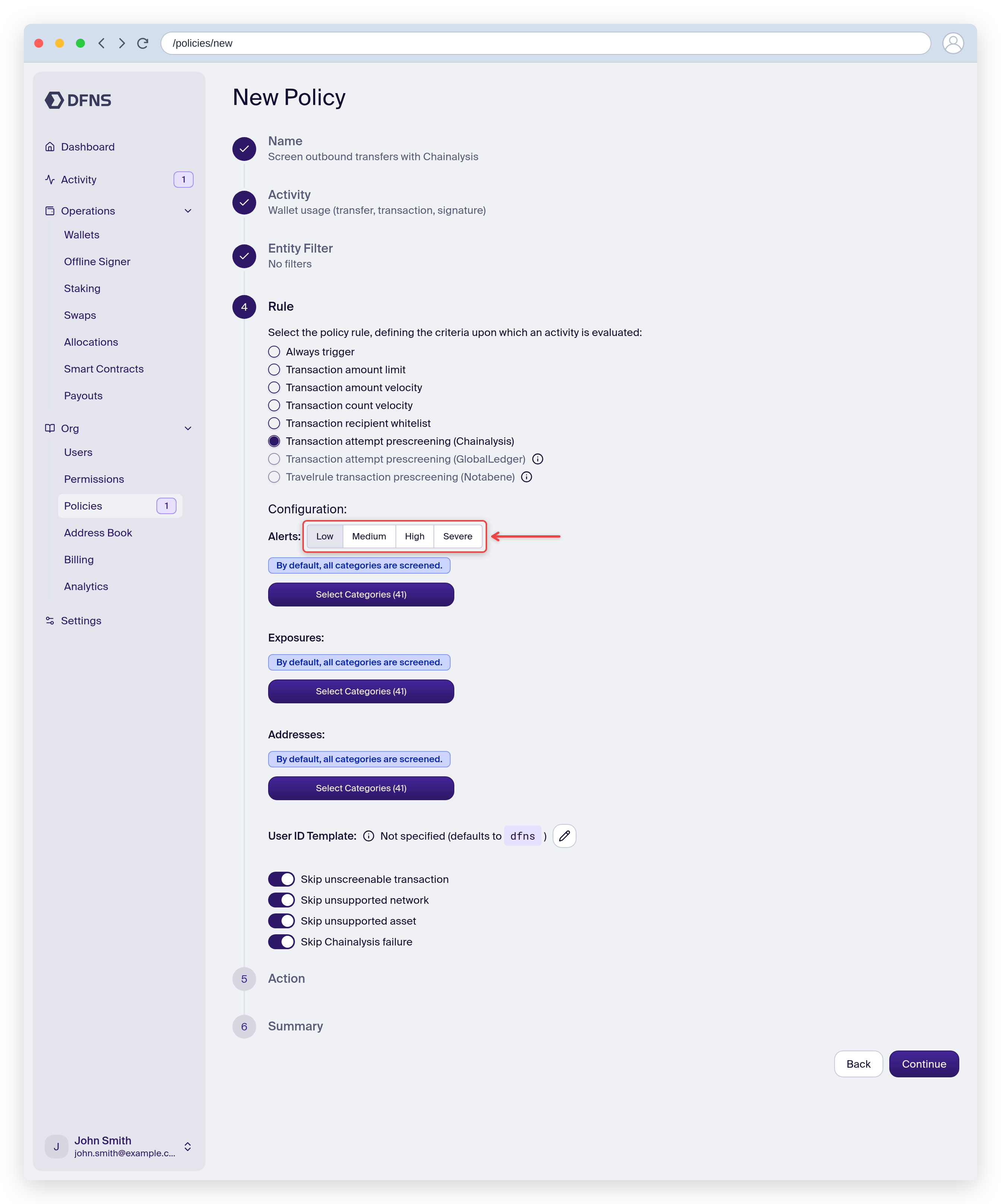
Go to **Policies**, click **Create Policy**, give it a name, and select the **Wallet usage (transfer, transaction, signature)** activity.
On the **Rule** step, choose **Transaction attempt prescreening (Chainalysis)**. Set the minimum **alert level** that triggers the policy (Low, Medium, High, or Severe), and optionally restrict the alert, exposure, and address **categories** or set a **User ID template**.
Pick the action taken when the rule triggers, then review and **Save**. You can scope the policy to specific wallets or [tags](/guides/signing-policies).
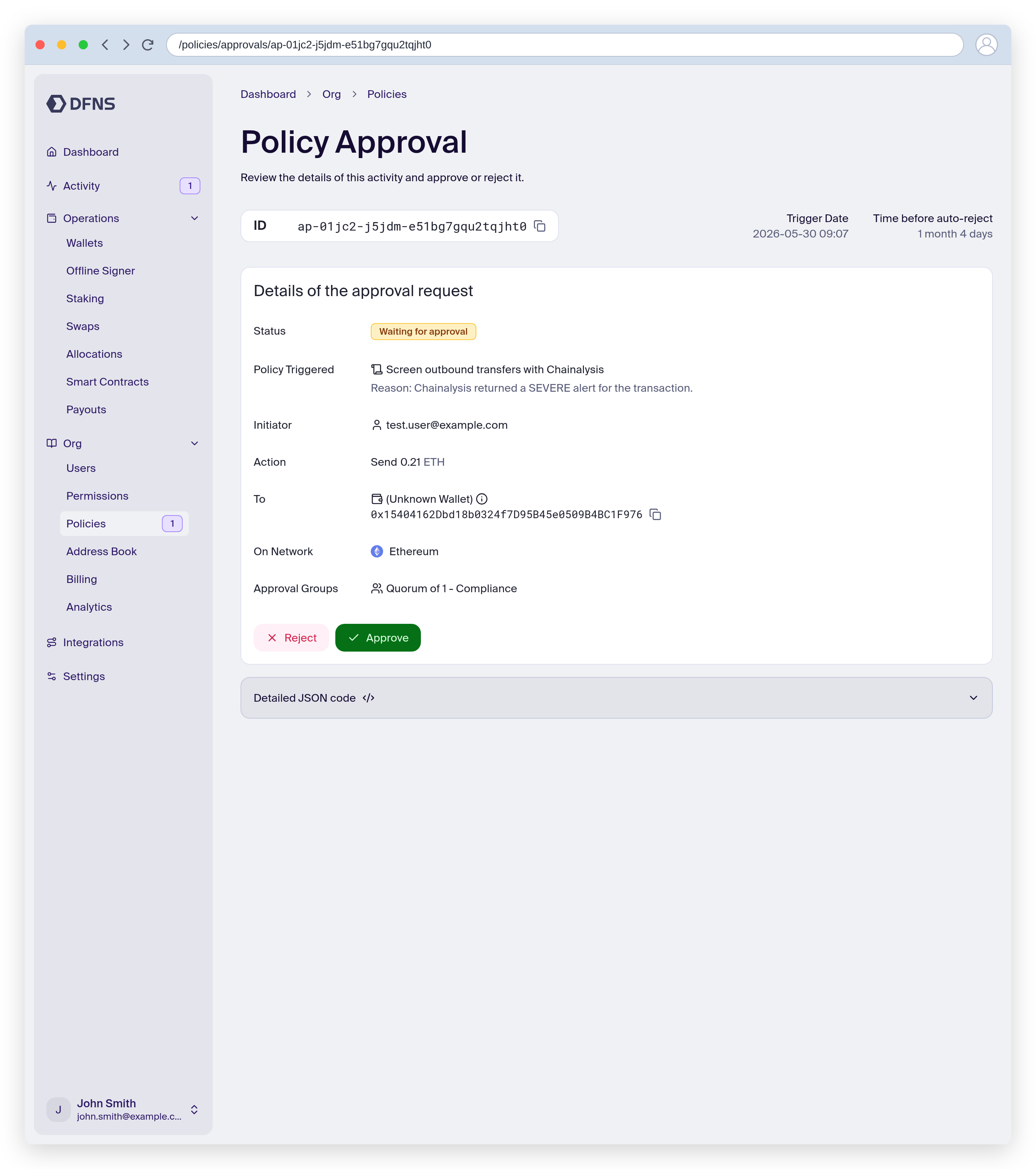
When the action is `RequestApproval`, a flagged transfer stays pending until an approver reviews it. The approval page shows the triggered policy and the reason, with the full Chainalysis evaluation under "Evaluation details".
### With the API
Create a policy with:
* Activity kind: [`Wallets:Sign`](/api-reference/policies#walletssign-activity)
* Rule kind: [`ChainalysisTransactionPrescreening`](/api-reference/policies#chainalysistransactionprescreening-policy-rule)
* Action kind: [`Block`](/api-reference/policies#block-policy-action), [`RequestApproval`](/api-reference/policies#requestapproval-policy-action), or [`NoAction`](/api-reference/policies#noaction-policy-action)
When the policy triggers, the Chainalysis screening results are included in the [`policy.triggered`](/api-reference/webhook-events) webhook event.
## Inbound transfer screening
Incoming transfers detected by the DFNS indexer can be screened by Chainalysis and reported to you.
### From the dashboard
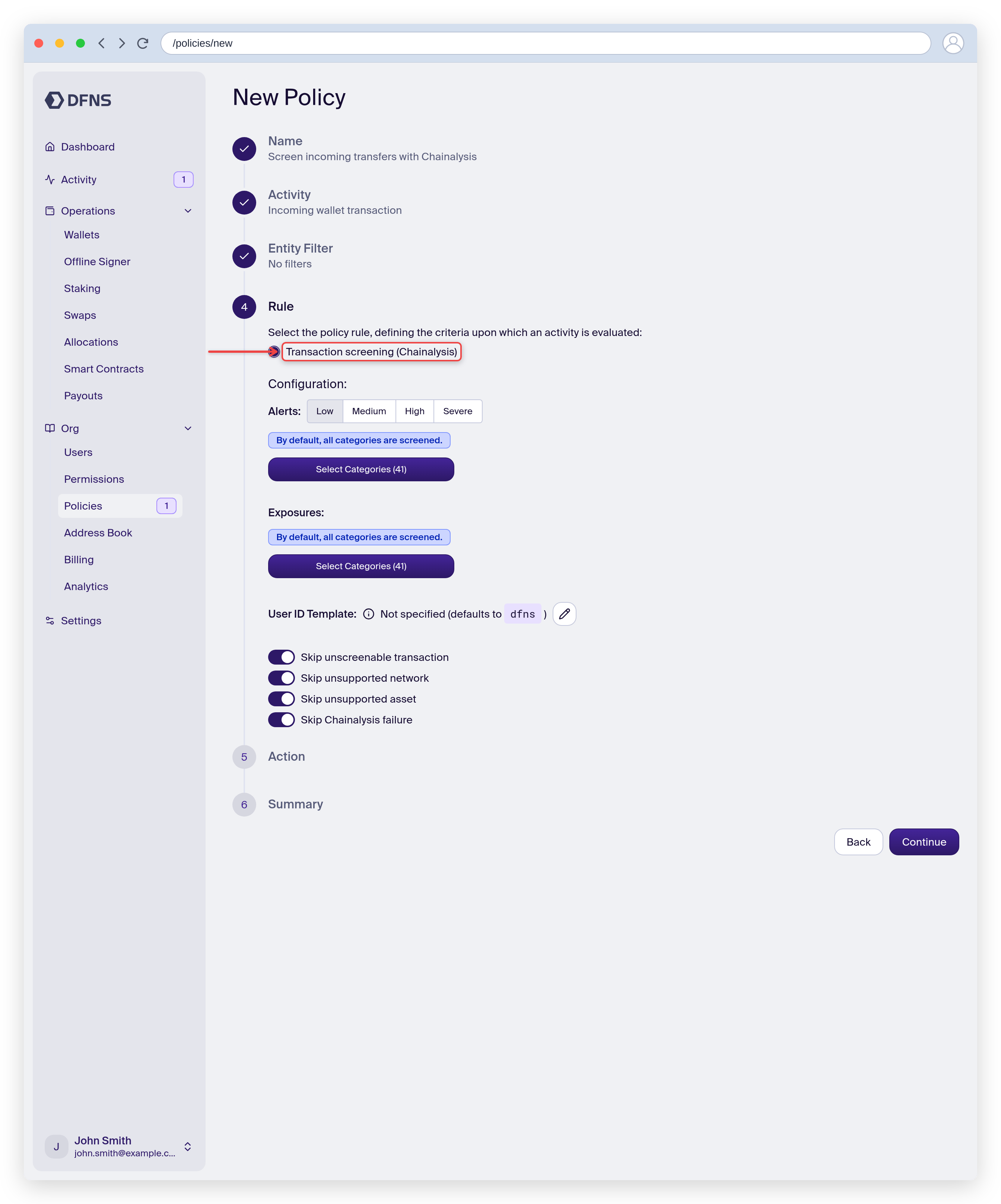
Go to **Policies**, click **Create Policy**, give it a name, and select the **Incoming wallet transaction** activity.
On the **Rule** step, choose **Transaction screening (Chainalysis)** and configure the alert level and categories.
Incoming screening reports results without blocking, so the action is **No action**. Review and **Save**.
### With the API
Create a policy with:
* Activity kind: [`Wallets:IncomingTransaction`](/api-reference/policies#wallets-incomingtransaction-activity)
* Rule kind: [`ChainalysisTransactionScreening`](/api-reference/policies#chainalysistransactionscreening-policy-rule)
* Action kind: [`NoAction`](/api-reference/policies#noaction-policy-action)
When the policy triggers, the Chainalysis screening results are included in the [`policy.triggered`](/api-reference/webhook-events) webhook event.
## Supported networks
For the most up-to-date list of supported networks and assets, check [Chainalysis KYT documentation](https://www.chainalysis.com/product/kyt/).
### Native token transfers
Native token transfers on the following networks can be screened:
| Network |
| ------------- |
| `Algorand` |
| `ArbitrumOne` |
| `AvalancheC` |
| `Bitcoin` |
| `Bsc` |
| `Ethereum` |
| `FantomOpera` |
| `Litecoin` |
| `Optimism` |
| `Polygon` |
| `Solana` |
| `Tron` |
| `XrpLedger` |
### ERC-20 token transfers
ERC-20 token transfers on the following networks can be screened:
| Network |
| ------------- |
| `ArbitrumOne` |
| `AvalancheC` |
| `Bsc` |
| `Ethereum` |
| `Optimism` |
| `Polygon` |
 ### With the API
Create a policy with:
* Activity kind: [`Wallets:Sign`](/api-reference/policies#walletssign-activity)
* Rule kind: [`ChainalysisTransactionPrescreening`](/api-reference/policies#chainalysistransactionprescreening-policy-rule)
* Action kind: [`Block`](/api-reference/policies#block-policy-action), [`RequestApproval`](/api-reference/policies#requestapproval-policy-action), or [`NoAction`](/api-reference/policies#noaction-policy-action)
When the policy triggers, the Chainalysis screening results are included in the [`policy.triggered`](/api-reference/webhook-events) webhook event.
## Inbound transfer screening
Incoming transfers detected by the DFNS indexer can be screened by Chainalysis and reported to you.
### From the dashboard
### With the API
Create a policy with:
* Activity kind: [`Wallets:Sign`](/api-reference/policies#walletssign-activity)
* Rule kind: [`ChainalysisTransactionPrescreening`](/api-reference/policies#chainalysistransactionprescreening-policy-rule)
* Action kind: [`Block`](/api-reference/policies#block-policy-action), [`RequestApproval`](/api-reference/policies#requestapproval-policy-action), or [`NoAction`](/api-reference/policies#noaction-policy-action)
When the policy triggers, the Chainalysis screening results are included in the [`policy.triggered`](/api-reference/webhook-events) webhook event.
## Inbound transfer screening
Incoming transfers detected by the DFNS indexer can be screened by Chainalysis and reported to you.
### From the dashboard